Unlocking 2026: 50% Off On WordPress Plugins Get It Now >

Directorist - Date format dd-mmm-yyyy

Directorist - Date format dd-mmm-yyyy

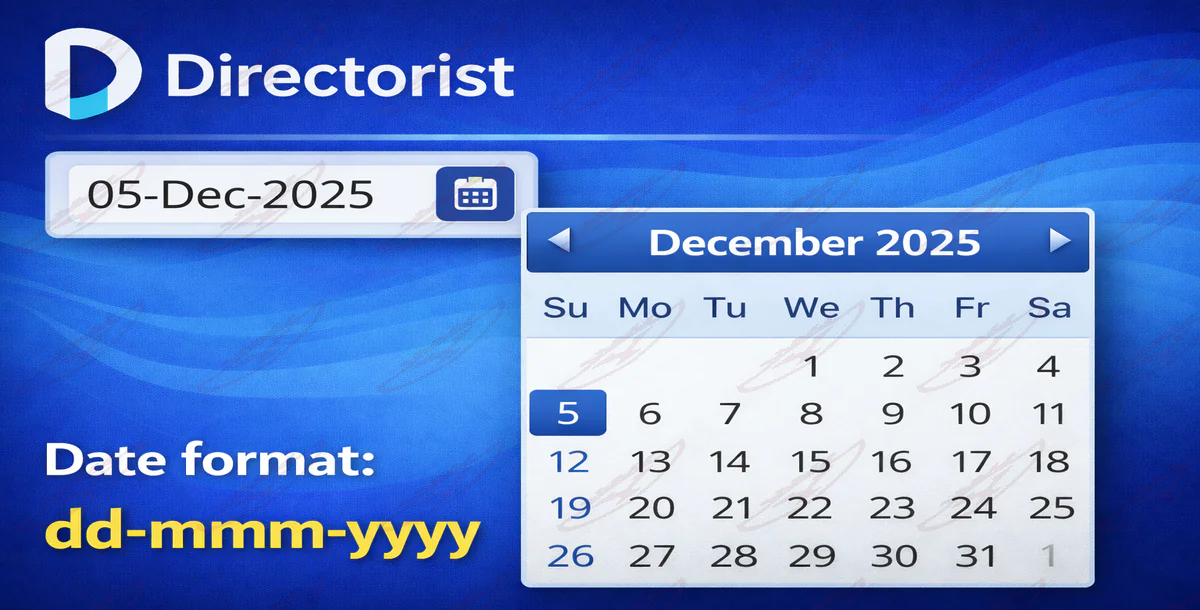
A clean, user-friendly date input that displays dates in an easy-to-read dd-mmm-yyyy format (for example, 05-Dec-2025) instead of numeric dates. Visitors can either type the date or select it from a responsive calendar popup with clear month names, making date selection faster and reducing input errors.

The calendar automatically adapts to desktop and mobile screens, opening in a visible, well-positioned layout without overflowing the page. Dates entered by users are handled seamlessly in the background, so the experience feels smooth and intuitive with no extra steps or settings required.

This enhancement improves clarity, usability, and overall form experience for anyone interacting with date fields on the site, especially on mobile devices.

Features

  • Displays dates in a clear dd-mmm-yyyy format (e.g. 05-Dec-2025)
  • Built-in calendar picker with a visible calendar icon
  • Mobile-responsive datepicker that fits and repositions correctly on small screens
  • User-friendly placeholder to guide correct date entry
  • Supports manual typing or calendar selection
  • Automatically handles and corrects common date formats
  • Clean, modern UI that blends naturally with existing forms
  • Improves readability and reduces input errors
  • No page reloads or extra steps for users
  • Works seamlessly across modern browsers and devices
License Option
Free Free
$1.65 $8.25
Quality checked by Yousuccess
Full Documentation
Future updates
Author Support

Published:

Dec 29, 2025 10:38 AM

Version:

v3.4

High Resolution:

Yes

Tags:

ultratrak's items

We use cookies to personalize your experience. By continuing to visit this website you agree to our use of cookies

More